
No products
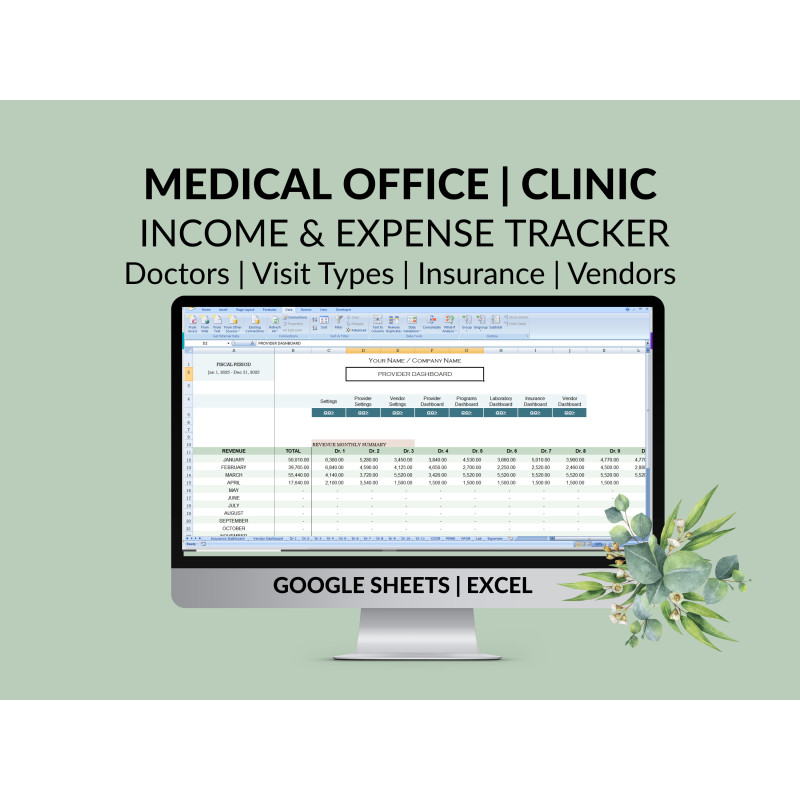


Clinic Medical Office Spreadsheet Tracker: Income Expenses Doctors Visit Types Insurance Vendors Locations
MB103
Take Control of Your Clinic’s Finances — Without Complicated Software
Running a clinic is complex. Managing your finances shouldn’t be.
This Clinic & Medical Office Income and Expense Tracking Spreadsheet gives you instant clarity into where your money is coming from, where it’s going, and which providers, services, and insurance plans are driving profitability—all in one easy-to-use system.
No accounting background required. No subscriptions. Just clear, actionable financial insight.
See What’s Profitable — Instantly
Know exactly which Providers, Programs, Lab Tests, Visit Types, and Insurance Plans generate the most revenue. Built-in dashboards update automatically so you can make informed decisions without manual calculations.
Save Time on Financial Tracking
With guided data entry and drop-down lists, recording income and expenses takes minutes—not hours. Spend less time in spreadsheets and more time running your practice.
Make Smarter Business Decisions
Compare performance across Providers, Visit Types, and Insurance Plans to identify growth opportunities, optimize scheduling, and improve cash flow.
Stay Organized Across Locations & Vendors
Track expenses by Vendor and Office Location so you always know who’s getting paid, how much, and where your money is going.
Built for Clinics — Not Generic Businesses
This spreadsheet is designed specifically for Clinics, Medical Offices, and Healthcare Practices, so it matches how healthcare revenue and expenses actually work.
How It Works
-
Record income by Provider, Program, and Laboratory
-
Assign Visit Types and Insurance Plans to each visit
-
Track expenses by Vendor and Office Location
-
View real-time monthly and year-to-date dashboards
-
Use any 12-month fiscal or accounting period
What’s Included
-
5 Real-Time Dashboards
-
Provider Dashboard
-
Program Dashboard
-
Lab Dashboard
-
Insurance Dashboard
-
Vendor Dashboard
-
-
Preloaded & Ready to Use
-
11 Provider tabs
-
3 Health Program tabs
-
1 Laboratory tab
-
15 Insurance Plans
-
12 Vendors
-
5 Office Locations
-
-
Flexible & Customizable
-
Easily customize categories, providers, vendors, locations, and insurance plans
-
Additional tabs available as a customization for a nominal fee
-
-
Simple, Error-Free Data Entry
-
Drop-down menus
-
Clear input fields
-
Space for detailed notes
-
-
Step-by-Step Instructions
-
Includes visual, easy-to-follow setup and usage guidance
-
Perfect For:
-
Solo practitioners
-
Multi-provider clinics
-
Medical offices with multiple locations
-
Healthcare practices that want clarity without costly software
Available in Google Sheets and Microsoft Excel
Download Instantly and use.
You will get an Excel File as well as a PDF File with a Google Sheets link that will enable you to download it.
The PDF file also has detailed step-by-step instructions.
You will also get spreadsheets with sample data for easy reference.
-------------------
VIDEO of Clinic Tracker
--------------------
Design
- Eye soothing pastel colors that can be customized by you
- Graph to give a quick visual overview of all offices
- Intuitive flowing design
Support
- Please reach out to me if you have any questions.
Frequently Asked Questions
Who is this spreadsheet designed for?
This spreadsheet is ideal for Clinics, Medical Offices, and Healthcare Practices of all sizes. It works well for solo practitioners, multi-provider clinics, and practices with multiple locations.
Do I need accounting or bookkeeping experience to use this?
No. The spreadsheet is designed with no learning curve. Data entry is simple, guided, and supported by drop-down menus. Step-by-step instructions with images are included.
What can I track with this spreadsheet?
You can track:
-
Income by Provider, Health Program, and Laboratory
-
Revenue by Visit Type and Insurance Plan
-
Expenses by Vendor and Office Location
-
Monthly and Year-to-Date financial performance through real-time dashboards
How many providers, programs, and locations are included?
The spreadsheet includes:
-
11 Provider tabs
-
3 Health Program tabs
-
1 Laboratory tab
-
12 Vendors
-
5 Office Locations
Additional tabs can be added as a customization for a nominal fee if you need more.
Can I customize categories, providers, insurance plans, or vendors?
Yes. All categories, providers, insurance plans, vendors, and locations can be easily customized to fit your practice.
How do the dashboards work?
The dashboards automatically calculate and update in real time based on the data you enter. You’ll see clear summaries for Providers, Programs, Labs, Insurance Plans, and Vendors without needing to run reports or formulas.
Can I compare providers and insurance plans?
Absolutely. You can easily compare:
-
Provider performance by revenue and visit type
-
Revenue and visit types by insurance plan
This helps you identify top performers and profitable services.
Does this support different fiscal or accounting periods?
Yes. You can use any 12-month period as your accounting or fiscal year.
Is this a one-time purchase?
Yes. This is a one-time purchase with no subscriptions or recurring fees.
What format is the spreadsheet in?
The spreadsheet is available in Google Sheets and Microsoft Excel, so you can use it online or offline.
Will this replace my accounting software?
This spreadsheet is designed for financial tracking, visibility, and decision-making. While it may not replace full accounting software for tax filing, it provides clear, organized financial data that can easily be shared with your accountant.
Is support included?
Yes. The spreadsheet includes detailed instructions with images, and customization support is available if you need additional providers, programs, vendors, or locations.
This is copyrighted to MoneyUsage.com and is for your own personal use. It cannot be sold, shared or otherwise redistributed.
More info
----------------
REVIEWS
----------------

Very helpful and easy to use!